The best apps updated for iPhone Duo
Thirteen apps that already use the big screen, the outer screen and the half-open pose, and what each one does differently.
October 23, 2026
iPhone Duo goes on sale today, 23 October, in more than 70 countries, including the UK, the US and Australia. Open, it's a 7.6-inch screen. Closed, there's a 5.4-inch screen on the outside. And it stands half open, like a small laptop.
Apps have to be updated to make use of it. An app that hasn't been sits in the middle of the big screen with black around it. One that has fills the screen, moves its tabs and buttons into a bar down the right-hand edge, and changes its layout as you fold and unfold the phone. Updated apps have a "Made for iPhone Duo" badge on the App Store.
We've been getting Roadtrip ready for iPhone Duo since Apple announced it, so we've kept an eye on what other developers are doing. These are the apps we've found that are updated already, and what each one does differently. An app is only here if its release notes, or a hands-on review from this month, say what it does on the Duo. Apple's own list is longer, but some of those apps haven't shipped their update yet.

Roadtrip Petrol Calculator
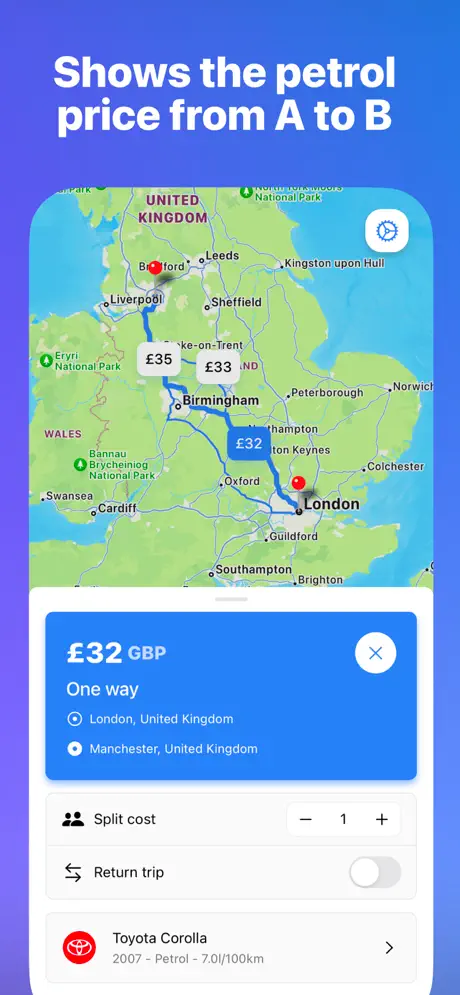
See the petrol cost from A to B
The Roadtrip app easily shows the cost to drive from A to B in your exact car model. It's super easy to use – just type in your car reg plate – plus it's completely free to see petrol prices, with no ads.


Roadtrip
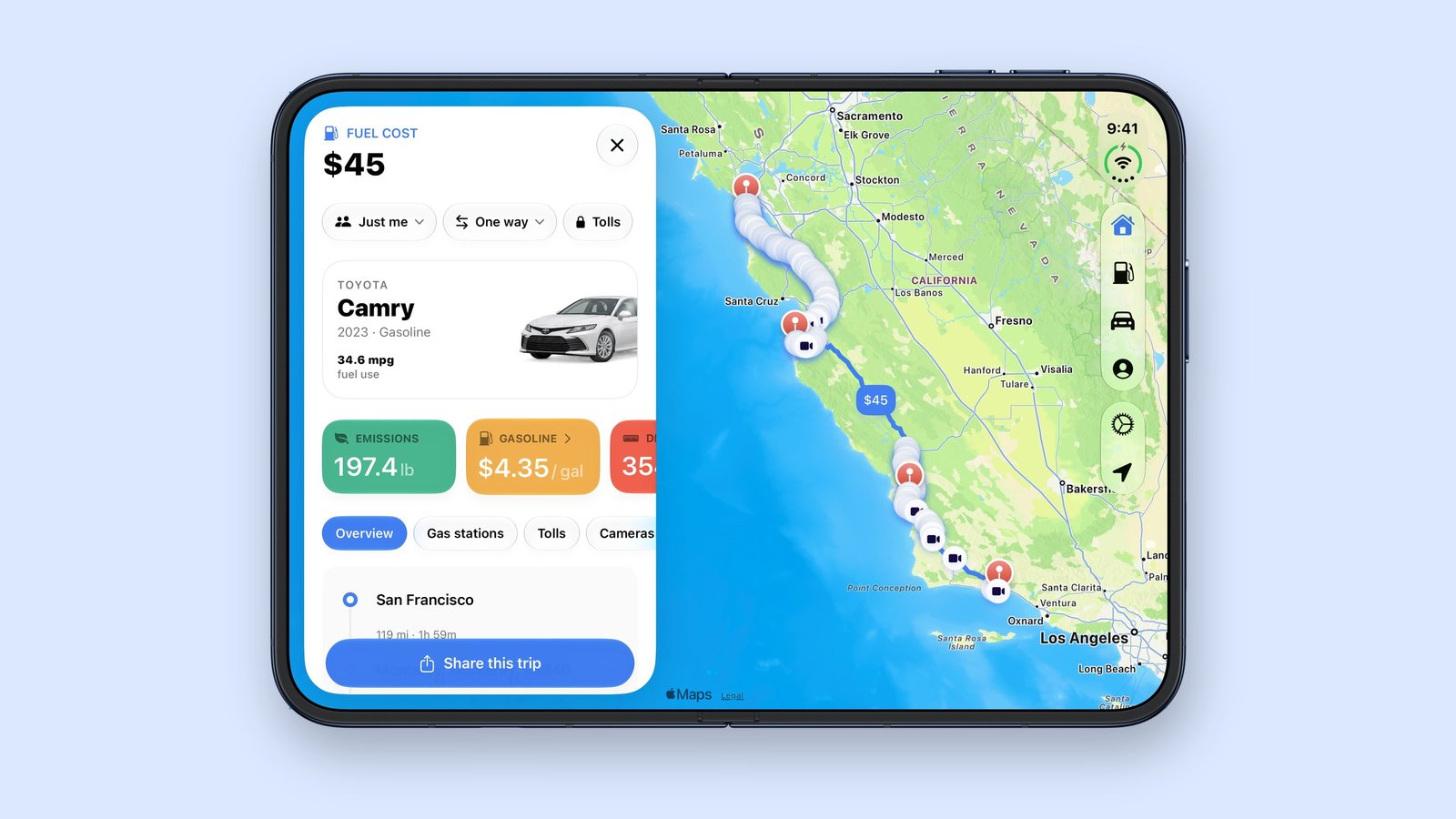
Our own app, so take this one with a pinch of salt. Roadtrip 4.0 came out today, the same day as iPhone Duo. Open the phone and your trip sits in a panel beside the map, with Home, Stations, Cars and Me in the bar down the edge of the screen. Stand it half open and the map goes on the top half while you plan on the bottom: where you're going on the left, fuel prices near you and your recent trips on the right. Closed, it works as it does on any iPhone.
Things
The to-do app reshapes itself for every pose: closed, open, folded like a book, or sharing the screen with another app. Open it and a sidebar shows all your lists. Its buttons sit in a bar down the right side, in reach of your thumb, and you can drag the Magic Plus button into a list to add a to-do exactly where you want it. That's in Things 3.25.
Flighty
During a flight, stand iPhone Duo up like a tent and Flighty shows your progress, so you can follow the flight hands-free from the tray table. That came in Flighty 4.11.2 on 21 October.
Slack
Slack uses the width for two columns: channels and people on the left, messages on the right. Home, DMs, notifications and search move to the right-hand edge, and you can hide the left column when you want the room.
Netflix
Closed, you can browse Netflix's clips on the outer screen, then open the phone to keep watching on the big one. Half open, the video plays on the top half and the playback controls sit on the bottom half.
Video fills the outer screen as you scroll. Open it and you can watch upright or sideways, with comments loading on the right and staying there as you keep scrolling. Meta has updated Facebook and Threads for iPhone Duo too.
Tesla
The Tesla app splits into two columns: controls on the left, and a bigger view of your car or your home's energy on the right. That's climate, charging and security beside a large picture of the car, or power moving between your solar panels, Powerwall, home and the grid. It came in version 4.62.
Fantastical
The calendar app added iPhone Duo support in version 4.2.3 on 13 October. On the big screen it shows your calendars, tasks and menus together.
CARROT Weather
CARROT 6.9.2 added iPhone Duo support and multiple windows, and its Super Res Radar shows two panes at once on bigger screens, in portrait and in landscape.
Sky Guide
Sky Guide 13.1 grows as you open the phone, with star maps from edge to edge on the big screen.
MLB
The MLB app has a new tab bar for iPhone Duo, and its Live Activities and scoreboards change layout for every orientation. That's in version 26.18.3.
Delta
The game emulator's 2.0 update has controller skins for every pose, in portrait and landscape, and runs in Split View beside another app. Closing the phone puts DS games to sleep, just like closing a real DS.
Deck-Man
The most fun of the lot. Deck-Man turns iPhone Duo into a 1980s cassette player. Open, you pick your music as tapes, from Apple Music. Close it and the outer screen shows the tape turning, with the playback controls underneath.
Not updated yet
Google Maps and Waze don't mention iPhone Duo in their release notes yet (Google Maps 26.42.2 on 20 October, Waze 5.26 on 21 October). In Roadtrip you can still open directions to any fuel station in either of them.
How we checked
We read each app's App Store release notes on 23 October. Where the notes say an app supports iPhone Duo but not what it does, we used these, all published in the last two months:
- Apple: iPhone Duo announcement, 9 September
- 9to5Mac: how iPhone Duo shows apps that aren't updated, 9 September
- Apple: apps made for iPhone Duo, 22 October
- MacRumors: Tesla app for iPad and iPhone Duo, 22 October
- Tom's Guide: iPhone Duo apps tested, 22 October
Spotted an app we've missed, or one that's changed? Tell us.
